Water Lock: the eject tone that comes with your watch
Apple Watch models from Series 2 onward are swim-proof, and they ship with a neat trick: Water Lock. When enabled, the screen ignores touches so wet sleeves do not trigger random buttons — and when you unlock it, the watch plays a short burst of sound from its speaker that pushes water out of the speaker cavity. That burst is the original 165 Hz eject tone every water-eject app imitates.
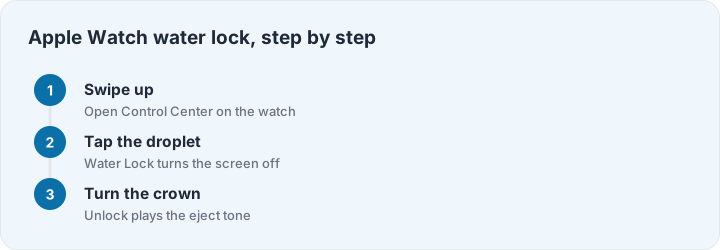
Using it needs no app and no settings. Swipe up from the watch face to open Control Center, tap the water droplet icon, and the watch enters Water Lock. After your swim or shower, press and hold the side button (or turn the Digital Crown, depending on model) until the watch unlocks — you will feel a pulse, hear the tone, and water beads out of the speaker slot. The watch also shows a water icon in Control Center while locked, so it is easy to verify the state at a glance.
When to use the watch and when to use this site
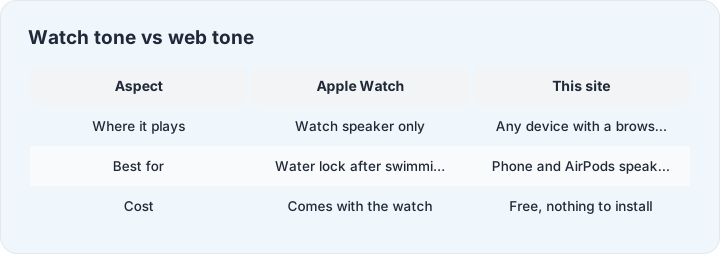
The watch tone plays from the watch’s speaker, which is brilliant for the watch and useless for your phone. That distinction drives everything: after swimming with your watch, use Water Lock — it is built in and immediate. For a phone that took a splash, the watch cannot help; the tone has to play from the wet device itself. That is what the web tool on our home page is for: open this site on the wet phone, press start, and the same mechanism works from the phone’s own speaker.
The same logic rules out the app-store shortcuts for AirPods and other earbuds: any tone played by the phone comes out of the phone, not the earbuds. For earpieces, the honest method is the gentle manual routine in our AirPods guide — and for iPhone speakers specifically, the iPhone page has the phone-specific walkthrough.
A word on “water eject shortcut” apps
Search the app store and you will find dozens of water-eject shortcuts and apps. They all do the same one thing: play a tone from the device’s speaker. That is the whole mechanism — there is no sensor magic, no hardware access, no secret frequency. This site plays the identical tone in your browser with no install, no ads and no permissions, which is why we are comfortable saying the apps are optional.