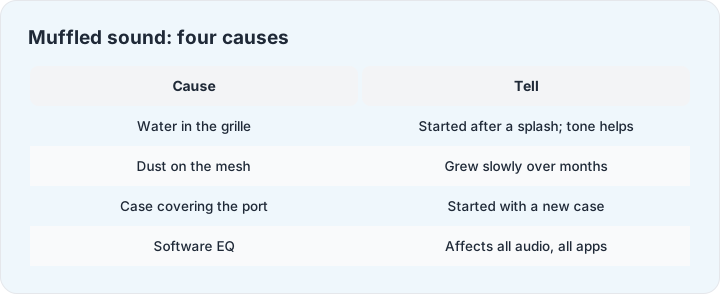
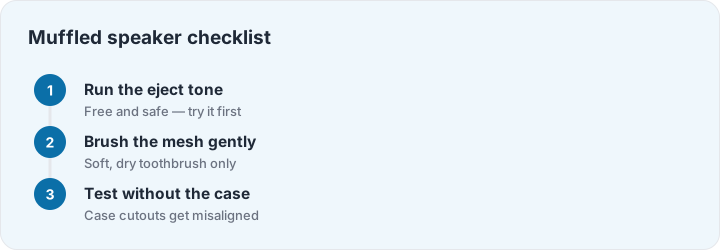
Muffled sound is a complaint with four different causes that all sound the same to the ear but respond to completely different fixes. The fastest path is running the checks in separation order — each step either fixes the problem or eliminates a suspect, and the whole pass takes five minutes.
Cause 1: water in the cavity (started suddenly)
If the muffle began right after a splash, rain or a pocket laundry incident, it is water sitting in the speaker cavity — the most fixable cause on this list. Run the eject tone with the speaker facing down, two or three passes. This clears the majority of fresh-water muffles outright; what remains after the tone usually clears on its own within a day of air drying.
Cause 2: dust and mesh residue (grew slowly)
Muffle that crept in over months is debris: lint from pockets, skin oils and dust building a fine blanket over the acoustic mesh. Vibration helps — the low sweeps on the cleaner page buzz loose particles — followed by a gentle brush with a soft, completely dry toothbrush, mesh facing down so dislodged lint falls out rather than in. No liquids, no pins, no compressed air held too close: it drives debris inward and can damage the driver with cold shock.
Cause 3: the case (started with new hardware)
Cases with misaligned speaker cutouts muffle sound exactly like a blocked mesh. The tell: the muffle arrived with a new case or a new phone-in-case combination. Take the case off and play anything — if the sound clears, the fix is a better-fitting case, not cleaning.
Cause 4: software EQ and effects (affects everything)
Equalizers, “sound enhancement” toggles and accessibility audio settings can flatten a speaker into a muffle. The tell here: the muffle affects every app equally and often both speakers or headphones too. Check the system EQ and per-app audio settings with everything flat as the baseline. And if all four causes are eliminated and the sound is still wrong, that leaves hardware — time for the repair math.