Why iPhones muffle so easily
Modern iPhones are water-resistant, which surprises people when the speaker sounds underwater after a splash. The explanation is simple: water resistance protects the electronics, but the speaker must have an opening to the outside world, and that shallow cavity next to the charging port collects droplets like a tiny swimming pool. The phone is fine — the speaker is literally playing through water. The eject tone vibrates the droplets out through the same opening they came in.
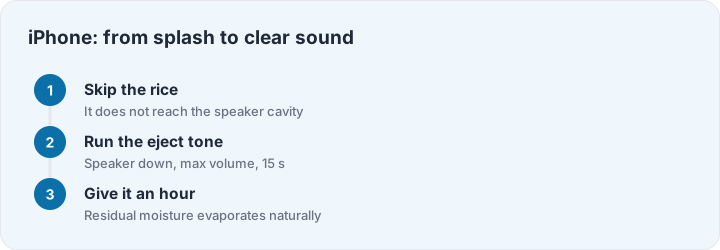
Run the sequence with the speaker facing down and volume at maximum. On a genuinely wet iPhone you will hear the tone sound underwater at first, then clearer on each repeat as the cavity empties. Two or three runs clears most splashes. If the sound is still muffled an hour later, leave the phone screen-down on a dry towel overnight — residual moisture evaporates on its own — and retest in the morning before assuming damage.
The rice bag, honestly
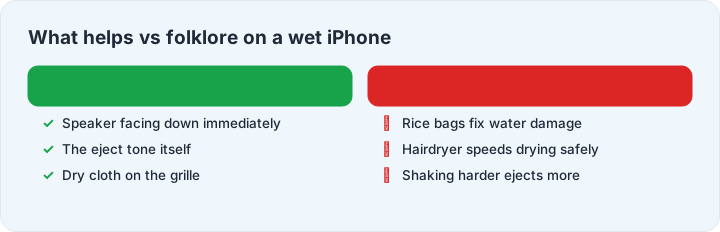
Every iPhone water story includes rice, so here is the straight answer: rice does almost nothing for a wet iPhone. Water that got into the speaker cavity sits too deep for rice to reach, and water inside the phone needs time and airflow, not desiccants in a sealed bag. Worse, rice dust can migrate into ports. What actually helps: power off if the dunk was serious, wipe the outside, keep the speaker facing down, run the eject tone, and give it hours, not minutes. Skip hairdryers — hot air pushes water deeper and can damage the battery. The full protocol, minute by minute, is in the rescue guide.
One more iPhone-specific trap: after beach or pool days, water often sits in the Lightning/USB-C port, and iOS will refuse charging with a warning. That warning is protecting your phone — tap nothing, leave the port facing down in dry air, and it clears within hours. For earbuds wet on the same beach day, the AirPods guide takes over.